Sunday, June 12, 2011

Automate your Android

I've been updating my Nexus S phone a few days ago (to the latest Cyanogen release) and got to check out some new apps out there. Here's a cool free app that allows you to create simple automated actions on the phone based on certain conditions or events - AutomateIt.

This app allows you to create simple "When event/condition A happens, do action B" rules, for example:
* When I come home - turn on the WiFi on my phone (so it can connect to my home WiFi)
* When I leave home - turn off the WiFi to save battery
* When I plug-in my headphones - open the music player app (since that's the next logical action anyway)
* When I unplug my headphones - close the music app (otherwise, it will continue playing on the speaker for everyone around me if I forgot to pause it first).
* When I open Waze (nagivation app) - set volume to 100%, so I can hear the driving instructions on the speaker
* When I close Waze - set volume to 50% (I always forget to lower the volume back, and next time I listen to music it starts blasting into my ears).

and so on...

It's free and simple to use - here are some more examples of useful rules for you to check out.

Friday, May 20, 2011

Take Your Music With You Everywhere Using Subsonic

I have lots of music sitting on my computer, gathered over time. Yet often when I listen to it I'm somewhere else - and as much as the storage capacity of music players and mobile phones increased over the years, it's still much too small to hold it all. Having to choose what to copy to my mobile device is annoying - I listen to one kind of music in the background when I'm working, and something else when I'm in the gym; while driving I usually prefer podcasts or audiobooks; and it's a hassle to change the selection often enough so I don't listen to the same stuff over and over.

A few days ago I finally found the perfect solution - given that my mobile phone is always connected and my home computer has ample bandwidth, why not just stream the music directly? Subsonic does just that - it's a simple media streaming software, with matching desktop, web and mobile apps that allow you to browse and listen to your music from any device with internet connection. 

After a quick setup you just point it to your music folder and it's accessible from anywhere. It has additional useful features such as creating different users, so you can share the music with friends, or transcoding on-the-fly between different formats, which allows you to convert file formats your phone might not support (such as flac, ogg, etc..) into streaming mp3. 

And there's the issue of bandwidth. When my phone is connected to WiFi I might not care about it too much but on 3G connection even my 5GB monthly data plan will come short if I'm listening all day at work. Here on-the-fly transcoding comes to help, since you can define different bitrate limits for 3G vs. WiFi connections, for different users or for mobile vs. web/desktop players. After some experimentation, I've actually configured it so stream  music to my phone in ogg format (at 112 kbs for 3G) to save bandwidth since it's a newer and more efficient encoding than mp3. Last but not least is the Offline option - the mobile app stores a cache of your downloaded music on the phone (I set it to 1GB for now), so you can listen to those tracks even when you're not connected.

So how do you get started?

Download Subsonic here and follow the guide. If you decide to get a little deeper, you can get some more details about configuring transcoding here, or - just ask me.

All I can add is not only I've been able listen to anything I want these last few days, wherever I am, I was also able to listen to many of the new albums which were waiting for me to check out but I didn't have the time for before.

Monday, March 14, 2011

Making Mobile Calls While Traveling - Without Selling The House

I am currently making plans for my next trip, to Greece.  Since I will be doing the accommodation reservations on the go, there will be more phone calls than usual when travelling. Yet when I checked the roaming call rates of my cellular provider (Orange), I was in for a surprise - above 11 NIS/min for calls inside Greece and 20 NIS/min to Israel (10.2 with a "Global Savings" program). 

Since I don't intend the phone bill to be more expensive than the flight ticket, I went looking for a better option. The short version is that getting a SIM card with the SIM 014 program by Bezeq International seems to give the best rates (2.09 NIS/min in Greece), with 013SIM by 013 Netvision being a good alternative.

Generally there are two kinds of products for international mobile calls - Pre-Paid and Post-Paid. 

Pre-Paid means you are buying a "calling card" ahead of time, charged with a certain amount of "units" or sum of money. You use a special number when calling and the card number, until you've run out of credit, and need to buy another card, or charge your account with additional sum. The advantage here is the control over your spending, since you can never pay more then the value of the card. But I don't like the more difficult process of making the call, and that you can run out of credit in the middle of a conversation. Also, you have to commit ahead of time to a certain amount of call minutes, and even if you don't use them all they expire after a while.

Post-Paid means you pay per-usage with your credit card. You buy a new SIM card (a one time charge) and just use it normally - including storing your contact numbers on it, etc. With many programs, you can buy an international SIM card once, and use it for years, from many countries. I like the simplicity of this.

There's a good article (by kamaze.co.il) comparing the different services offered in Israel. I made a online spreadsheet which summarizes the ones I liked, and compared the initial price and the calling rates from several countries which I am planning to visit in the future. Another option which is not included is buying a local Greek SIM card, which might have a little lower initial price and rates, but will only be useful inside Greece and I won't be able to use it in later trips.

In the end, the SIM 013 has the lowest initial price, but  SIM 014 program by Bezeq International has the best rates and over time will be cheaper. 


Friday, March 4, 2011

What Are You Collecting?

I've been thinking recently about stuff we tend to accumulate over time.

My father for example is quite the handyman in the house - he can fix a door, lay a cable across the apartment, fix an electrical appliance, etc. Over the years, he gathered a variety of tools and accessories for different tasks, and he always has the right one for the job as well as the skill to use it correctly.

My mother has a sewing machine, and when she has the time, can make a nice piece of clothing or fix one, or perhaps make some pretty pillow covers for the living room. And she got, stored around the house, various fabrics, magazine cutouts with designs, threads, buttons and all the other accessories.

Why am I writing this? I've just been upgrading my computer and as always, as I was preparing to put in the new parts, I got out a big storage box. There, I got a variety of parts, cables, connectors, power adapters and many other components I have accumulated over the last 15 years or more, from every computer I assembled for myself or relatives, every gadget or piece of electronics bought. And it does come very handy at times, when you need to replace a broken CPU fan, test if some component is faulty by putting another one instead, or even when you just need a rather weird type of screw for the computer case.

What do you have gathering dust in some storage box?

Sunday, February 27, 2011

Bringing Old Family Photos Back To Life

I've been going through some albums and photos recently, and found a box with a bunch of films. After a more careful look, I saw these were our old family photos - developed films from the last 20 years as well as slides that were 30 years old and more. A few of those were printed, and maybe we had them in an album somewhere, but mostly they are no longer available for us, and the means to reproduce them are disappearing with the years.

So I decided to bring them back from the confines of this box and digitize them. My options were limited however - there are several photo labs that can still scan films and slides, but the problem is cost and image resolution. The basic scan produces images of about 1.5 megapixels which is rather useless, and for a reasonable resolution of about 2000x3000 (6 megapixels) the cost to scan all we had (some 35 films and 70 single slides) would be in the thousands of shekels. 

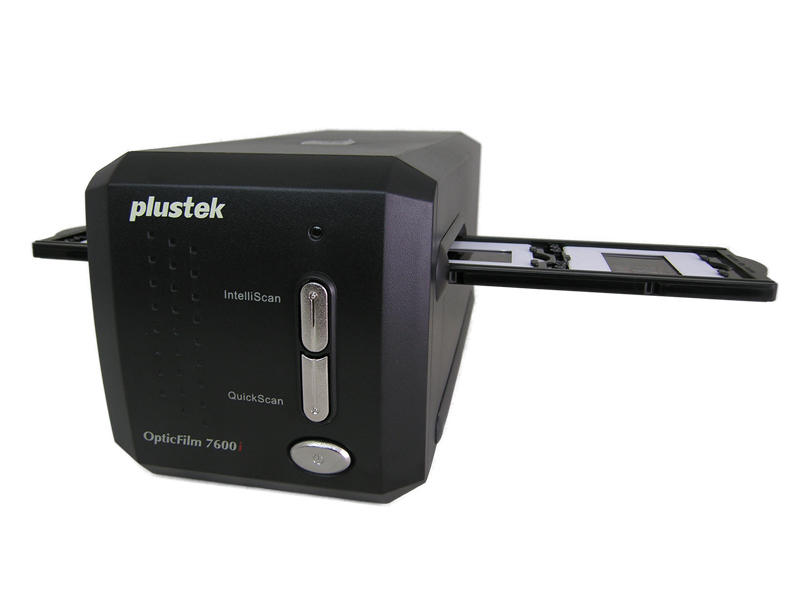
After looking for other options, I found that although it will take some more time and effort on my part, it's better to purchase a dedicated film/slide scanner by myself and sell it second hand later when I'm done. This will be both cheaper and allow me to scan those family photos at the best possible quality. After some research, my current choice is this model - Plustek 7600i SE, which has good resolution and a mechanism for detecting and removing dust and scratches from the scan based on an additional infra-red scan of the film.

Hopefully I'll be done in a month or so, and we'll be able to look easily at our old family photos again.

Monday, January 3, 2011

Parsing a time that doesn't exist

I've been working on an integration project recently, using TIBCO BusinessWorks, and encountered an amusing bug. The code was parsing a bunch of date/time strings, and would works correctly except for a very small number of cases where it would fail with some 'Unparseable date' error. It would work for '26/03/2010 03:20' or '26/03/2010 01:20' for example, but fail for '26/03/2010 02:20'.

After some trial and error, head-scratching and Googling the problem was found - the system function used was implemented internally with java.text.SimpleDateFormat, and since the time string didn't specify the timezone the code assumed some timezone (based on locale I guess) that took DST (Daylight Saving Time) into consideration. So in this timezone, when at 26/03/2010 02:00 the clock advanced to 26/03/2010 03:00, the entire hour in between simply didn't exists and this timestamp couldn't be parsed. The solution was to specify a timezone which ignores DST, such as GMT, and in this particular case was done by appending " GMT+02:00" to the string. 

So much for the time continuity...

Saturday, December 25, 2010

Goodbye Nokia, Hello Android and Nexus S

These are my thoughts as I'm waiting for my shiny new Nexus S, which I ordered from US a few days ago, to land in Israel.

I've been a Nokia kind of guy for many years now, since my first mobile phone. Nokia phones had a simple button layout, consistent user interface and menus which made it easy to use whatever model you had. When I looked for my first smartphone a couple of years ago - I eagerly waited for the Nokia 5800. It's a great phone which served me well despite a few quirks, but now is showing its age and not in a way that some next model can fix.

What I mean is that as years went by, smartphones became more and more our mobile personal computers, where most important are not just the original hardware and software but the apps you install later. And the Symbian OS Nokia uses is rather old and hard to develop for, so almost none of the apps developed in the last year or two that I wanted could be installed on my phone. And even though I don't know much about Meego, the mobile OS Nokia will using for future smartphones - I think it will be too late. All apps today are developed for iPhone and Android first due to their market share, and it's hard for me to imagine what technical advantages might the Linux-based Meego have over Andorid, which is undergoing such fast development and improvement.

My parents are still using the simpler Nokia "feature-phones", since they are much more comfortable with the ordinary keys rather than a touchscreen, and there Nokia might hold its dominance for some time. This is a low margin market which addresses the much larger world population that can't afford the luxury of a smartphone. Yet as all technology goes, this will also get cheaper in a very short period, and soon enough I think there will be cheap Android based smartphones available for this large market.

So I say goodbye to Nokia and hello to Android. What would you suggest for the eager owner of a fresh Android phone? What are the must-have apps or settings I should start with?


Thursday, December 23, 2010

Photo storage on the go

I love travelling, and when I do - I always take a camera with me, capturing the places I've seen and moments I want to remember. For the past two and a half years I've had the 400D Canon DSLR and its counter is getting close to the 20,000 photos mark. Those are a lot of great memories, but also quite a bit of storage space, especially since I always shoot in RAW format to have the flexibility for future editing. I some cases, I actually shoot RAW+JPEG, so that I can easily browse and share photos during the trip using the JPEGs, and the RAW files are for later storage and editing when I get back home. And when the trips get longer, there's the question of how to store all those photos on go.

The simple choice at first is just having more and bigger memory cards. I got to carrying 3 cards with 4Gb each, and this would usually be sufficient for my normal two-week trips. But there's a limit, and when I was preparing for my 7 months long trip to South East Asia last year, I had think of another way. 

First of all, just buying more and more memory cards is expensive, hard to carry and manage, and I wouldn't want to store too much on a single card. A common solution is to have a portable hard drive - it's easy to use, has plenty of storage space, reliable, relatively inexpensive and useful in itself in daily life even after the trip. However, since I wasn't carrying a laptop this meant relying on external computers, which isn't trivial on a trip to SE Asia. Internet Cafes are usually not hard to find on the beaten track of trekkers, but the quality of computers varies greatly and many of them are infected with myriad viruses transmitted by different USB devices. So finding a reasonable computer, scanning it for viruses and using it to copy the photos from the card to the hard drive it a rather long and annoying procedure.  A bigger problem was the longer treks, such as the Annapurna Circuit, which take several weeks with no computer access.

My solution was a portable hard drive with a twist, in a metal case with an internal battery and a built-in card reader - Nexto ND2700. The main advantage of this device is that is can directly copy photos from the memory card, without the need for a computer or even electricity. The charge is sufficient to copy some 80Gb of photos, which gives you more than enough travel time between recharges. The device itself is basically a sturdy metal case with a laptop hard-drive inside - it's even easy to open the case and replace it. And besides travelling, it is useful as a regular portable hard drive with a USB connection. I've had it for a year and a half now, and the only disadvantages I can think of are that it's a little more cumbersome to use than a regular portable drive, since it has it's own power button; and the price - when I bought it, the 250Gb model cost about twice as much as simple hard drive with the same capacity.

So who would I recommend such a device for? It is mostly useful if you take lots of photos, usually RAW on a DSLR (since JPEGs from compact cameras take much less space) and might travel for several weeks at least with no laptop or reliable access to computers. Otherwise, a regular portable hard drive would probably suffice.

Saturday, December 18, 2010

Shopping and Shipping from US to Israel

It is often when purchasing something, especially electronics, that I would much prefer to buy in the US than in Israel. It's usually because the price difference is so large (a Canon lens I just bought costs 440$ in US and 670$ in Israel) or because some products are sold in US only (like the Nook eReader). In any case, shipping is a problem, either because a direct UPS delivery to Israel is quite expensive, but more often because the stores would only ship inside the US.

For a few years now there exists a company that solves just this problem - Mustop (they have merged with a similar company called Usonestop). The idea is simple - you register, and get your own unique address in the US, which is where you ship you purchase (they have warehouses in New Jersey). More often than not, the stores will also have free shipping to a US address. It's also recommended that you forward to Mustop your purchase receipt email. They receive your package and forward it to your Israeli address using DHL. 

The shipping price is very reasonable, and for larger purchases is quite worth it - there's a 15$ handling fee, plus a shipping price based on the package weight and volume (details here). They recommend you contact the store and ask for as compact a package as possible. You still have to consider the customs and VAT costs in Israel of course, but it is often much cheaper than to buy in Israel (and there are no customs for photographic equipment for example).

So - happy shopping everybody!

Monday, November 22, 2010

Recycling Electronics

Cleaning up recently I had a lot of old electronic stuff to throw away - broken CD drive and power supply, batteries, a couple of speakers that no longer work, etc. Before tossing it all to garbage, I took a look if there is something more useful that can be done - perhaps some of those parts and the metal in them can be salvaged and reused. That got me to this list of locations (.doc) all around the country (via this site) where electronic waste can be disposed of safely, which I did. So take a look next time, there's probably a collection facility just nearby.

Monday, November 8, 2010

Corporate Spam

When receiving corporate email, it often includes a signature with the senders position, contact info, and possibly a company logo or some other small branding element, which I think is appropriate. Recently however I received a work related email which had in it, embedded around the mail content, four corporate ad images on the side, a large banner on top and the following signature at the bottom. 


I could not imagine how hijacking any outbound company email and "enriching" it with company ads in such a manner could contribute to the company's image, not to talk about the signature ad for the external service doing this, which mostly reminds me of the crappy "sent by hotmail" sigs.

However, after a second glance the bottom "do not enrich" link gave me hope that I might still unsubscribe. Clicking on it, I was asked for confirmation and then presented with the following message:


So now, someone should decide in person if I am deemed worthy enough to not receive those ads in my inbound emails from that company... And knowing the company, this request of mine was probably forwarded to whatever in-person version of /dev/null they have.


Thursday, November 4, 2010

Listen...

This post is about something I "discovered" for myself some seven years ago, and have been doing ever since - listening to audiobooks. This manner of storytelling existed long before the invention of print - whether sharing some experience near a camp fire, or a father passing knowledge to son. And although print allowed us a much more efficient and durable way to transfer knowledge, listening to a story is a profoundly different, and better experience. 

When told by a narrator, the plot becomes much more personal, and the characters become alive compared to just reading the "dry text" of the story. And yet, unlike movies, which seem to provide you with even richer experience, audiobooks do not take away your freedom to imagine and create your own world from the words to the writer. Because after seeing the movies Lord Of The Rings or Harry Potter for example, those images will be fixed in my mind when I reread the books, which looses some of the richness of possibilities in the world created by the author. Furthermore, listening to a narration requires you to slow down and pay attention, whereas my ability to read fast may sometimes cause me to skim through sections, and thus loose some of the detail and feel of the story.

Besides being a great way to read a book, audiobooks are very practical - they can be listened to almost anywhere and are an excellent way to use any "dead time" you might have. I've finished some four or five audiobooks just this month, and that's without much dedicated "reading" time - I've been listening in my car while commuting to work, when going to a store to buy groceries or when running on a treadmill in the gym.  I actually went running instead of swimming some time lately just because I had to get to the end of the plot... And listening to audiobooks in the car has a very interesting side effect - I am not impatient or annoyed when being stuck in traffic, because this is no longer "wasted time". There were even several times when I parked at home and then just kept sitting in the car for a couple more minutes, just to finish listening to some interesting part of the story.

For shorter periods of time, when you might not want to listen to just a small part of a long story, I would recommend listening to podcasts. There are thousands of great programs that can be subscribed to and downloaded, for every possible taste, and those are usually shorter recordings. A friend of mine recently recommended me a wonderful Israeli podcast called Making History - those are about 30 mins programs about a variety of subjects, often connected to science but not only. This is a great program to listen to in the morning, on the way to work - subscribe to it here.

I hoped I convinced to you try it out if you haven't yet, and if you want - I have a hard drive full of things to listen to...

Sunday, October 31, 2010

Wikipedia and Education

As I've been helping my younger brother with homework, I was thinking about how the world around us changes whereas the education system has a hard time to catch up and adapt.

Certainly when my parents were growing up, and to some degree when I was in school, just finding information for, say, a history project, was quite an undertaking. You had to search and read through books in your school library, and then perhaps find some specific books in a larger regional library, and work to assemble those pieces into some body of work. Perhaps you even interviewed an older member of the family or a friend if he/she had some relation to the events. An those skills of gathering information were indeed quite relevant in the world.

Nowadays, give a class an assignment on, say, The Declaration of Independence, and many of the works you get back might be different variations of the same Wikipedia article. One the one hand, this is quite understandably frustrating to the teacher, who sees how little effort and thought was put into the work. One the other, I don't think the pupils are to blame here. 

The world has changed - the internet brings us a wealth of sources and information on any topic we wish to research, and students should be taught different skills - not of gathering anew information which is already out there but of filtering the relevant findings and analyzing them for insights or distilling the essence of an idea. 

Here is an approximate assignment from a while ago (in Geography class) that I think was an excellent example - "Image you are a travel agent and a client (a family, an elderly couple, a single traveler, etc...) comes and asks you to suggest a trip plan. Choose a destination and tailor a few days' trip to the client." This both gives the pupil freedom of choice as well as requires independent thought - you have to think what kind of trip plan you are preparing (walking outside vs going to museums...), research the country for attractions as well as distances and reduce all the possibilities to some logical plan that combines interesting locations and is achievable in the chosen time frame.

It will however take some time for this change to take place more widely. First, because it is much easier  for teachers to continue teaching the same way they are used to. And second, once each assignment is individual per student - there is no standardized answer sheet, like in a multiple choice exam, where the answers can be checked quickly. Rather the teacher has to evaluate each work on it's own, which takes more effort and dedication on his part.

Tuesday, October 12, 2010

Google Quicksearch Gibberish Auto-translate

Since I'm writing daily in two languages (Hebrew and English) and constantly switching between the two, it is quite often that I want to search in one language but type in another by mistake, so the result is gibberish.

Here a cool thing I noticed just recently - the correct search result (in the intended language) is suggested. And it works both ways - both Hebrew to English and back, although not in every case of course.


My guess is that this translation was learned based on user search histories, since after such a mistake the user immediately searches again for the correct word. Anyway, another cool idea that just "works" - it took me some time to notice that the (correct) suggestions were actually given for a search term typed in the wrong language. 

Tuesday, October 5, 2010

Getting Things That Matter Done

A friend made a survey recently about productivity, and wrote a post with some more ideas and how it worked for him. An interesting read, take a look.

When thinking about it, I might imagine two "me"s sitting on my shoulders, battling each other. There is something I need, or want to do, but I somehow waste the time, procrastinate, or get distracted by other things. So I make some task list to stay focused, put my headphones on, maybe even work from home.

But at home there's the danger of just watching TV, or responding to IM or email. So - I actually decided not to own a TV, which saves me a ton of time. And, grudgingly, I close Gmail. And actually working late at night has been quite productive for me. Not only am I more concentrated at night (not much of a morning person, check the time this was published...), but there's less distractions, nowhere to hurry to, just a quiet time when the world is at peace.

And yet, even when I'm in the state of mind when I know I should work, I sometime veer to doing something else which I also should do, but is not as urgent or important. Having an exam or a big assignment was often a great incentive to put a few solid hours of work on cleaning up the apartment, washing dishes, tagging my photo library or even writing a custom script to clean-up the ID3 tags in my music collection. Call it "constructive procrastination".

There is another "trick" that may help with such a case - working on a couple of projects at once. So that when you're tired or stuck on one of them, you can let it go for a while, work on the second one, and come back when you feel you are ready to start again.

However, there was a different idea I mentioned in that survey - "pair programming", in the more general sense. And for me the emphasis was not the better quality of work that results, but the fact that working together improves your focus, and reduces the chance for distraction. I'm not going to check email or blogs when working with someone. And if one gets tired or loses focus - the other can pick up, and so you just push each other to work more productively.

Which leads to what I actually wanted to write about, and that is motivation to do not just the daily tasks and chores, but also bigger things which matter to you, that you want to do or you know you should do, but you delay or avoid them, because of some fear or discomfort.

I'll give an example - I did a bunjy jump in Nepal last year, the third highest in the world. Scary stuff. By the time you get to the jump, you've discussed it with friends, paid for it, took a long bus drive there, got organized, waited for some before you to jump, and now you are standing on the step on the bridge above a 160m high gorge, scared out of your wits. But by that point, you are also already committed. You are too far into it to back off. So you look down, then decide it's a better idea to just look at the horizon - and jump. Then climb the 160m back to the bridge - and do the second jump :).

Here's another one - I just returned from a trek to the Alps, Tour de Mont Blanc, after of which I also climbed the Mont Blanc peak itself. I did plenty of treks before, yet this one was different - my first technical climb, walking on rocks and snow, through some dangerous sections and steep slopes, a hard hike up to the summit at night and back all the way down. But I did it with a friend, and we had a guide with us. Besides the assurance it gives - you are much more committed to each other (if one has to descend - you both do), support each other, and will not back down unless it's for serious reason. And it was a great sense of achievement getting to the top, knowing that this is something you can do.

The point is that stating your goal publicly or doing it with a friend gives you that extra commitment and motivation, besides you own will, that may be the push you need to get over your apprehensions and do whatever it is you want to accomplish.

An example I thought of as I was writing this - Matt Cutts (head of webspam team at google). He sets himself a 30-day challenge every month, blogs about it (and it's a very high traffic blog) and reports on the results. Things like trying meditation, biking into work every day, no caffeine, etc. And I think that stating it publicly on his blog makes it harder to just abandon something midway, because he has already committed himself.

How do I use it in daily life?
I think I did it when searching for my latest job, quite consciously. I didn't choose the exact area in which I already have experience, but a role that will challenge me both technically and personally with situations new to me, which I have to deal with, learn, and get better at. And this is a course I committed myself to by taking the position.

Here's the latest example - Since I enrolled in a nice fitness center, I thought I should start swimming more. Easy to think, but eventually it's slips away, and you start coming less often. So? There's a non-competitive 3.5 km swim across the Kineret every year that a friend goes to. And this year I told him - "sure, I'll come too", and registered myself. And I'm telling about it to all of you as well (all three of you.. :) ). So now I better actually do it, and if I want to finish it - I should better keep training, don't I?

Tuesday, September 28, 2010

I see you

I've read a short post a few days ago about a new gadget - a small videocamera that looks like an earpiece of a mobile phone, records continuously, can store a few hours of video and with a press of a button will save a clip of the last 30 seconds if you saw something interesting.

It's nothing revolutionary - just another gadget as electronics gets smarter and smaller, but it's being inconspicuous and the "always recording" mode made me think about the future that's almost here already.

It made me think of the "no cameras" signs we see here and there, like in airports or museums, where it's OK to see something with our own eyes but not to record, often for security reasons. It's quite useless even today, since any real "bad guys" would have no problems to conceal equipment and take a photo or video. But as such gadgets become small, cheap, and ubiquitous I think it may become quite common to just record everything happening around you during the day and then save the interesting bits for later. And preventing the general public from doing so will be difficult.

And I also thought of our expectation of privacy during our everyday life. We become more and more used to being photographed and filmed, either directly by someone we know, or just by chance, being in someones frame or perhaps just being caught in an embarrassing moment by a Google Street View car... And the younger generation will be accustomed to the notion of possibly being recorded at any moment, just as they live a much more publicly open life on the social networks, even if we have difficulties accepting this idea today, as you can read in this story (the motorcyclist was acquitted).

What do you think?

Friday, September 24, 2010

Email Goodies

In my last post, I talked about some problems with the current email clients. In this post I want to share a few improvements I read about recently, as well as some ways I manage my mail that help me to stay productive.

One cool browser add-on is Rapportive (via ReadWriteWeb), which displays a sidebar with additional information about the person you’re conversing with - his picture and info from various social networks. Here’s an example:

The limitation is that only the public info form social networks is shown (even if you’re “friends”), and also it’s less convenient when the correspondence includes several people.

Another interesting Chrome extension is Graph Your Inbox (via Google Operating System), which works with Gmail and gives you stats and insight into your emails usage patterns. Using Gmail search operators you can slice and dice your email history and visualize it.

Here’s an example of the amount of Buzz posts (from me and people I follow) this year:

A more interesting graph is my count of Facebook notifications, which shows a sharp increase in usage in summer 2009:

A recent article talks about many start-ups working in this area, so there are many improvements expected to come.

As far as managing my email, I receive enough email that reading it as it comes would be quite distracting. A few tools in Gmail are very useful to separate those that should be read and acted upon immediately, and those for later.

The first one is Labels and Filters - I have some 30 filters (rules) which label incoming email, and move most of it out of inbox. I label mails from social networks, financial institutions, university and work into a folder hierarchy for easy search later.
Unfortunately, Gmail doesn’t allow using filter rules based on Groups in contacts, so I had to manually construct a query string which matches each of the addressed in the “Friends” group, and label them as such - and those are mails I know come from people I correspond with, rather than some automated service.
Finally, here’s a simple but a useful rule to filter out much of the “funny” email I still receive from some friends and relatives - any email that was forwarded twice is usually junk, and it is moved into a “Fun” folder which I check on once a week:
Matches: subject:("Fw: Fw" OR "Fwd: Fw")
Do this: Skip Inbox, Apply label "Personal_Fun"

The last, but not least is the recent “Priority Inbox” that was introduced in Gmail. You should check it out - it’s a great idea, which I use to show three sections in my Inbox: Important mails I haven’t read yet, Starred emails which for me means TODO+Important, and other unarchived mail in Inbox which is basically TODO but not very important.

It takes a little while to train Gmail which mail should be marked as important or not - but it allows me to manage my tasks better as well as ignore unread mail which is not urgent, and that is a great way to reduce distractions.

That’s all for now, you are welcomed to share any interesting ideas about better using your email.

Sunday, July 11, 2010

Email From Strangers

I received a curious email today - an internal correspondence between a manager and some employees of a large Israeli travel agency, discussing a problem with billing some clients - including a screenshot from the internal ordering system, with the full details of a couple of credit cards, expiration dates, CVC numbers, personal details, etc. After the initial surprise, I guessed it was a typo error when filling the To: field in an email, and my name was autocompleted by mistake. I dealt with this agency once, about three (!) years ago, and so apparently was in the contacts list of the manager.

I responded with a somewhat cynical response informing about the mistake, and hoping that such a serious company would be more careful with my financial details as a customer. I received a quick response with an apology and an assurance my details are "out of reach of the systems' users". Oh, and the response began with - "Honorable DR,"...

Besides the humorous aspect, and the personal mistake made by the sender, such mistakes are inevitable, and are symptoms of the problem with the system, not the user. People will always make mistakes, and the design of the current email apps and the contacts autocompletion is that it is very easy to enter the wrong recipient - and hard to notice the error, especially when two people may have the same or similar names. Thus it is quite easy to sent some personal or sensitive internal communication to the outside world - and it's a mistake that might be impossible to undo. And in the specific case described above - I wonder why would my email even be in the autocompletion list, after a short communication three years ago?

Some solutions exists, but aren't sufficient or widespread at the moment.
One is to completely separate internal and external networks - to reduce the chance for information leak. This is used in security related organizations, but is very difficult to justify in most situations as internet access is critical in today's workspace. And it still does not prevent from sending an email to the wrong person in the organization (I remember quite a few such cases from my own service, ranging from highly classified information to very intimate conversations being misdirected).
A much more productive direction is for the system to give the sender a lot more information about the intended recipient, making spotting a mistake very easy at a glance - a thumbnail picture (like when sending a message in Facebook, also possible for internal organizational users), his/hers role or company name, and perhaps an infographic of how frequently are you communicating with that person.
I don't remember at the moment, but I read of some start-ups who have a product that enriches the email interface with lots of useful information about the recipients. And there's a Google Labs experiment called "Got the wrong Bob?" that tries to warn you if you choose a wrong recipient based on your usage patterns.

If you know of any existing solutions for this being employed, or have similar stories - you are welcomed to share...

Monday, June 14, 2010

Setting up - IKEA, Contacts and Tomato

I've been busy for the last few days. The non-computer related part was buying and assembling a bunch of IKEA furniture - surprisingly all my fingers are still intact and the things didn't fall apart yet...

I also found a little time to do one of those things that you know you should, bet never get to - I got all my contacts from the phones, gmail, facebook, linked-in, etc., merged them, cleaned up the phones and email info and put them in Google Contacts. This guide was quite helpful in the process. My only annoyance now is that I'm used to manage people on the phone by their Hebrew names, but on Contacts it's all in English, and I haven't thought of a good way to sync them.

I also finally set-up a WiFi network at the new appartment, so I can have internet without relying on the kindness of strangers with public wifi. Since my wifi router is a bit away from the computer, behind a couple of walls (I'll be splitting a neighbors internet connection) I wanted to make sure the signal is strong. This can be done by installing a custom firmware on the router called Tomato which gives you a lot of control over how your router works including transmission power. It also has a better GUI, nice graphs, and a bunch of tools and settings to play around with, such as prioritizing traffic by application (for example - giving VOIP traffic higher priority than p2p).

That's all for now, will be playing with some more stuff in the near future.

Saturday, June 12, 2010

Email is for old people...

I've been chatting on Facebook with a distant cousin of mine who said she still didn't receive some link I was meant to send her. She was quite surprised when I told her I emailed it a week ago. "Email? You should have told me! That's for old people..." was more or less her reply.

When I think about it, my 12 years old brother doesn't use email much or at all, and most of his online communication is via facebook and chatting. Maybe as they get into university or corporate environment they will start using email, or mayble the world is changing and I'm now an old guy using email...

What are your experiences on this?